Can You Install a Backup Camera on a Car
Yes, you can install a backup camera on nearly any car by choosing the right system for your vehicle’s make and model.
Backup camera installation involves assessing wiring needs, often tapping into the reverse light circuit for power, and selecting a compatible display or monitor.
Wired systems offer stable connections but require cable routing, while wireless models simplify installation.
Proper mounting and signal setup improve safety during reversing.
Keep exploring to uncover step-by-step installation methods and troubleshooting tips.
Key Takeaways
- Yes, you can install a backup camera on most cars, especially models made after 2000 with reverse light circuit access.
- Backup cameras improve rear visibility, reduce blind spots, and enhance safety while reversing or parking.
- Installation involves selecting a suitable wired or wireless camera compatible with your vehicle’s electrical system.
- Mount the camera near the rear license plate and connect it to the reverse light circuit for automatic activation.
- Use proper tools, route wiring carefully inside trim, and test the camera image and angle before finalizing installation.
Can Your Car Support a Backup Camera?
How do you determine if your car can support a backup camera? First, assess backup compatibility by reviewing your vehicle’s make, model, and year. Most cars manufactured after 2000 have the necessary provisions for backup cameras, but older models may require additional adaptations.
Next, focus on wiring considerations. You’ll need to locate a power source, usually the reverse light circuit, to activate the camera when you shift into reverse. Additionally, ensure there’s a suitable video input, either through an existing display or an aftermarket monitor.
Inspect the wiring harness and routing paths to avoid interference or damage. If your car lacks these features, installing a backup camera may require professional modifications to the electrical system to achieve full functionality and maintain safety standards.
Types of Backup Cameras That Fit Most Cars
You can choose between wired and wireless backup camera systems, both compatible with most vehicles. Wired options offer stable connections but require professional installation and routing cables through the car. Wireless models simplify installation by transmitting video signals via Wi-Fi or Bluetooth, though they may experience occasional interference.
Wired Backup Camera Options
Where do you start when choosing a wired backup camera for your car? Focus first on backup camera durability to ensure it withstands weather, vibrations, and road debris. Look for cameras with IP67 or higher ratings for water and dust resistance.
Next, wiring harness compatibility matters; your chosen camera must connect seamlessly with your vehicle’s existing electrical system. Verify the harness type and voltage requirements match your car to avoid installation issues.
Common wired backup cameras include RCA and composite video systems, which provide reliable video transmission with minimal interference. Prioritize cameras with adjustable mounting brackets for precise alignment.
Wireless Backup Camera Models
Which wireless backup camera model suits your vehicle best? You’ll want a model offering easy installation and reliable wireless setup. Popular options include mirror-integrated cameras, license plate frame cameras, and roof-mounted units.
Mirror-integrated models replace your existing rearview mirror, providing a discreet display with minimal wiring. License plate frame cameras mount directly around your plate, using wireless signals to connect to a dashboard monitor or your smartphone.
Roof-mounted cameras offer a higher vantage point but may require additional brackets. When choosing, verify compatibility with your car’s make and model, signal range, and video resolution.
Wireless backup cameras eliminate the need for complex wiring, reducing installation time and potential vehicle modifications. Prioritize models with secure, interference-resistant transmission to ensure consistent, clear video feed during reversing maneuvers.
How to Install a Backup Camera Yourself: Step-by-Step
To install a backup camera yourself, you’ll need basic tools like screwdrivers, wire strippers, and a multimeter. The installation process involves mounting the camera, routing the wiring through the vehicle, and connecting it to the power source and display. Follow each step carefully to ensure proper alignment and secure connections for optimal performance.
Tools Needed
Five essential tools will help you install a backup camera efficiently and securely. First, a multimeter is crucial for testing power sources and ensuring proper power management without overloading circuits.
Second, wire strippers allow you to expose wires cleanly for reliable connections. Third, a screwdriver set with various heads helps you remove panels and securely fasten the camera.
Fourth, electrical tape or heat shrink tubing provides insulation, maintaining car legality by preventing exposed wiring. Finally, a drill with appropriate bits is necessary for mounting the camera, especially if your vehicle lacks pre-drilled holes.
Having these tools ready ensures a professional and compliant installation that respects your vehicle’s electrical system and legal requirements. Proper preparation simplifies the next installation steps.
Installation Process
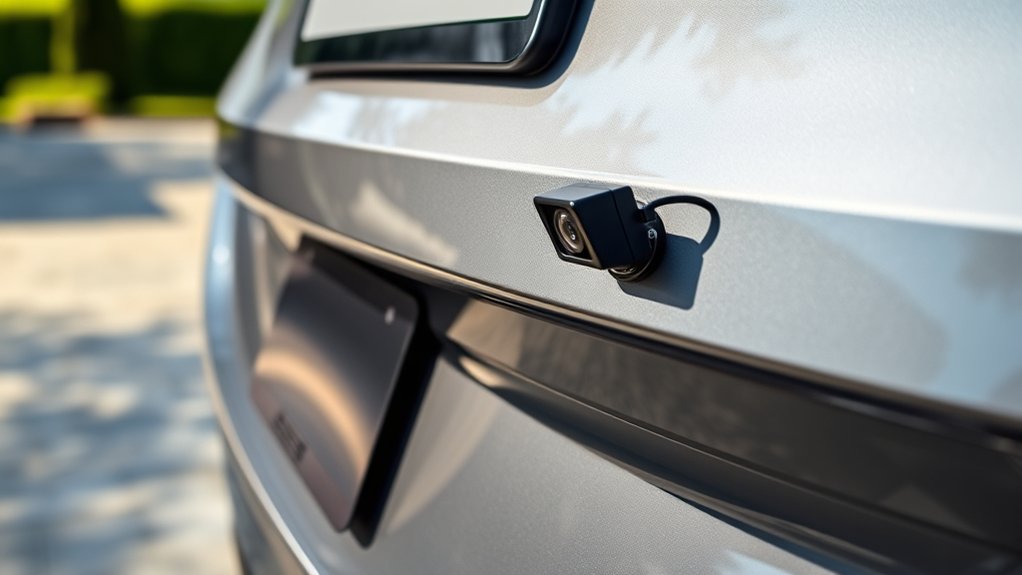
With your tools organized and ready, you can begin the installation process by first identifying the best mounting location for your backup camera, typically near the rear license plate. Clean the mounting surface to ensure secure attachment.
Next, drill holes if required and mount the camera using screws or adhesive. Route the camera’s wiring carefully through the vehicle’s trim, avoiding irrelevant topics like unrelated vehicle modifications.
Connect the power cable to the reverse light circuit, ensuring the camera activates when you shift into reverse. Then, run the video cable to the dashboard display or monitor, securing cables with zip ties to prevent damage.
Finally, test the camera’s functionality by shifting into reverse and adjusting the camera angle for optimal rearview visibility. These two word ideas, precision installation, are key for a successful setup.
Connecting Your Backup Camera to a Display Screen
How do you guarantee your backup camera’s feed appears clearly on your display screen? Start by confirming backup compatibility between your camera and the vehicle’s existing display system. Check the camera’s output format, typically RCA or digital HDMI, and ensure your screen supports it.
For display integration, use the correct input port on your monitor or infotainment unit. When connecting, route the video cable securely from the camera to the display, avoiding interference and minimizing cable length to reduce signal degradation.
If your vehicle lacks a factory screen, consider installing an aftermarket monitor designed for backup cameras, ensuring it matches your camera’s specifications. Finally, power the camera through the reverse light circuit, which activates the feed only when reversing, completing the integration for seamless visual feedback.
Troubleshooting Common Backup Camera Installation Issues
Why isn’t your backup camera working as expected after installation? Troubleshooting common issues often involves checking power connections, signal cables, and camera placement. These factors directly affect backup safety.
Poor camera placement can cause obstructed views or distorted images, undermining safety. Also, loose wiring or incompatible display screens can disrupt functionality.
| Issue | Possible Cause |
|---|---|
| No power | Blown fuse or bad wiring |
| No image | Faulty video cable |
| Flickering screen | Interference or loose cable |
| Blurry image | Dirty lens or poor placement |
| Incorrect angle | Misaligned camera mount |
Systematic inspection of these elements ensures optimal backup safety and reliable camera performance.
Best Backup Cameras for Easy Installation on Any Car
Which backup camera offers the easiest installation for your vehicle? Choosing a camera with broad car compatibility and minimal power requirements simplifies the process. Here are three top options:
- eRapta ERT01 Designed for universal car compatibility, it uses the standard 12V power supply, ensuring straightforward wiring.
- AUTO-VOX M1 Wireless design eliminates complex cabling, compatible with most vehicles, reducing installation time substantially.
- Garmin BC 30 Compact and mounts easily; it connects to your car’s existing power source with low power draw, compatible with various models.
Selecting a backup camera that aligns with your car’s electrical system and supports plug-and-play installation will save time and effort. Focus on models with clear wiring instructions and adaptable mounting options for a smooth setup experience.
Frequently Asked Questions
Will a Backup Camera Void My Car’s Warranty?
Installing a backup camera typically won’t void your warranty unless it damages factory wiring or components. To avoid warranty implications, consider professional installation or wireless alternatives that don’t require permanent modifications to your vehicle’s systems.
How Much Does Professional Backup Camera Installation Cost?
Professional backup camera installation typically costs between $150 and $400, depending on your vehicle and camera type.
You’ll want to confirm warranty implications with your dealer to ensure installation won’t void any coverage or affect your warranty rights.
Are Backup Cameras Legal in All States?
Of course, every state’s backup laws are a thrilling maze. You’ll find installation legality varies widely.
You can’t just slap a camera on and call it a day; check local rules to avoid legal headaches.
Can Backup Cameras Work in Extreme Weather Conditions?
Yes, backup cameras can work in extreme weather, but you’ll need regular calibration and maintenance to ensure accuracy and functionality.
Harsh conditions like snow or heavy rain may affect visibility and sensor performance without proper upkeep.
Do Backup Cameras Require Regular Maintenance or Calibration?
Like the heartbeat of a machine, backup cameras need maintenance reminders and calibration intervals to function effectively. You shouldn’t skip these; regular checks prevent faults and guarantee accurate imaging, keeping your safety system sharp and reliable.
Conclusion
Installing a backup camera on your car is a smart way to enhance safety and confidence while driving. Even if your vehicle wasn’t originally designed for one, versatile camera options make it a manageable upgrade.
By following clear installation steps and troubleshooting tips, you can achieve a seamless setup that feels like a natural extension of your car.
Embrace this subtle yet powerful improvement to protect yourself and others on the road. Installing a backup camera on a car is an effective way to improve your driving experience and safety.