How to Change Battery in Honda Key Fob
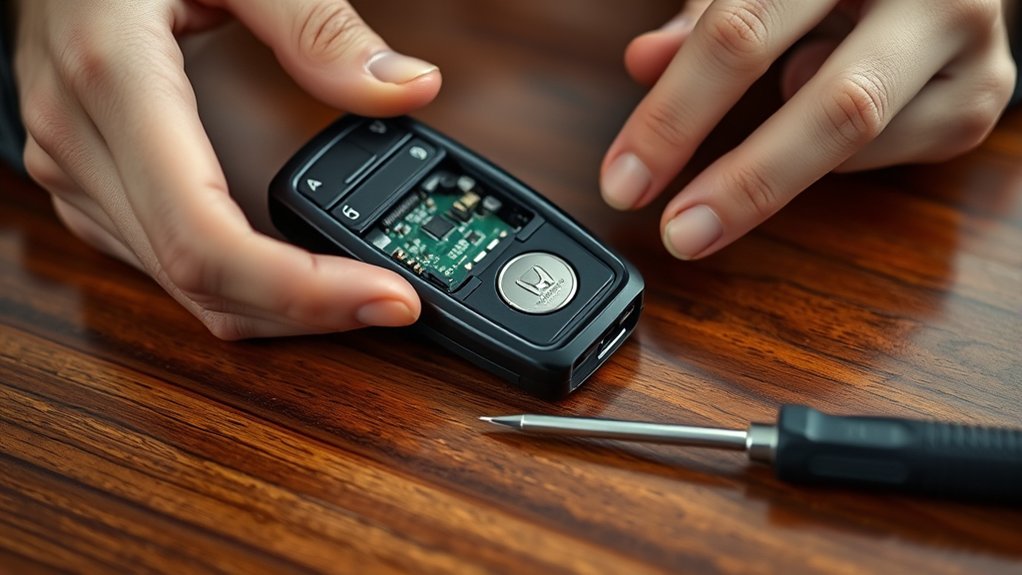
To change your Honda key fob battery, first identify the correct coin-cell type—usually CR2032 or CR2025—and gather a small flathead screwdriver or plastic pry tool. Gently open the fob at the seam without damaging clips, remove the old battery noting its orientation, and insert the new one matching polarity precisely.
Snap the fob closed securely, then test all buttons near your vehicle. Following these steps will help ensure proper function and guide you through troubleshooting and care.
Key Takeaways
- Identify the battery type (usually CR2032 or CR2025) by checking the code on the old battery before replacement.
- Use a small flathead screwdriver or plastic pry tool to gently open the key fob casing without damaging it.
- Remove the old battery carefully with tweezers, noting its orientation, and dispose of it responsibly.
- Insert the new battery with correct polarity, ensuring terminals align with the fob markings and the battery sits flush.
- Snap the fob halves back together securely, then test all buttons near the vehicle to confirm proper function.
What Type of Battery Does a Honda Key Fob Use?
What kind of battery powers your Honda key fob? Most models use a CR2032 lithium coin cell battery, prized for its stable battery chemistry and long shelf life. This battery delivers consistent voltage, ensuring reliable signal transmission between your fob and vehicle.
When handling your key fob, observe key fob etiquette: avoid exposing the battery compartment to moisture or excessive force, which can damage internal contacts and disrupt power flow. Using the correct battery chemistry is crucial. Substituting with inferior or incompatible types can cause malfunctions or corrosion.
Always source genuine or high-quality replacements that match the original specifications. By understanding the specific battery requirements and practicing proper key fob etiquette, you maintain optimal performance and extend the lifespan of your Honda’s remote entry system.
How to Identify When Your Honda Key Fob Battery Needs Replacing
Knowing the type of battery your Honda key fob uses is only part of maintaining its function. You need to recognize signs indicating the battery requires replacement promptly to avoid irreversible damage to the internal electronics or compromised waterproof seals.
| Symptom | Explanation |
|---|---|
| Reduced Range | Signal weakens, affecting remote operations |
| Intermittent Response | Buttons work inconsistently |
| No Response | Key fob fails to communicate |
| Warning Light on Dashboard | Alerts low battery status |
If you notice any of these signs, don’t delay replacing the battery. Prolonged use with a weak battery risks corrosion inside the fob, potentially breaching waterproof seals and causing costly damage.
Early identification ensures reliable performance and preserves the key fob’s integrity.
Tools You Need to Change Your Honda Key Fob Battery
To change your Honda key fob battery, you’ll need a few essential tools like a small flathead screwdriver and a replacement battery. First, identify the exact battery type, usually a CR2032 or CR2025, to guarantee compatibility. Having the right tools and battery on hand will make the replacement process quick and efficient.
Essential Tools Overview
A few specific tools are necessary to safely and effectively replace the battery in your Honda key fob. You’ll need a small flathead screwdriver or a plastic pry tool to carefully open the key fob casing without causing damage. A pair of tweezers will help you remove the old battery and position the new one accurately.
It’s important to handle the battery correctly and follow local recycling guidelines to ensure proper battery disposal, preventing environmental harm. Avoid using metal tools that can short-circuit the battery. Having a clean, well-lit workspace will also improve precision during replacement.
Preparing these essential tools beforehand streamlines the process, minimizes risk of damage, and promotes responsible battery disposal. This guarantees your Honda key fob functions reliably after the battery change.
Battery Type Identification
Before replacing your Honda key fob battery, you need to identify the correct battery type to guarantee compatibility and proper function. Most Honda key fobs use coin-cell lithium batteries, commonly CR2032 or CR2025.
Check your owner’s manual or open the fob carefully to read the battery code imprinted on the existing cell. Selecting the exact battery type ensures optimal battery ergonomics, maintaining proper fit and contact within the fob’s compartment.
Using an incorrect battery may cause malfunction or damage, leading to warranty implications if the device fails prematurely. Always choose a high-quality replacement matching voltage and size specifications.
Proper battery identification prevents operational issues and preserves your key fob’s longevity and warranty coverage.
Opening Your Honda Key Fob Without Damage
You’ll need a small flathead screwdriver or a plastic pry tool to open your Honda key fob without damage. First, locate the seam where the two halves of the fob meet. Then, gently insert your tool and apply light pressure to separate the casing without cracking or scratching it.
Tools Needed
Essential tools help you open your Honda key fob without causing damage. Understanding the key fob design and battery chemistry ensures you handle components properly during replacement. Using the right tools prevents scratches, cracks, or internal damage.
Prepare the following:
- Plastic pry tool: avoids marring the casing when separating halves
- Small flathead screwdriver: assists in gently lifting clips or tabs
- Tweezers: ideal for handling small batteries safely
- Clean microfiber cloth: protects surfaces from scratches and debris
- Replacement battery: matches the correct battery chemistry and specifications
Using these tools precisely respects the key fob’s intricate design and preserves the battery chemistry’s integrity. Avoid metal tools that can cause damage or short circuits. With these in hand, you’ll open your Honda key fob safely and efficiently.
Locating The Seam
A precise approach to locating the seam on your Honda key fob guarantees you open it without damage. Begin by inspecting the fob’s edges under good lighting to perform seam identification. The seam typically runs along the midpoint where the front and back halves meet.
Use your fingernail or a thin tool to trace this line gently, revealing the separation point without applying force. Proper seam identification is critical to preserving the casing’s integrity and ensuring the internal components remain secure.
Avoid pressing near the battery compartment to maintain battery durability, as excessive pressure can damage the battery or contacts. Correctly locating the seam sets the foundation for a safe battery replacement and extends your key fob’s operational lifespan.
Gentle Pry Techniques
Once you’ve accurately located the seam, apply careful prying techniques to separate the key fob halves without causing damage. Practice battery etiquette and gadget mindfulness to preserve your device’s integrity. Use tools and methods that minimize stress on plastic components and internal circuitry.
- Use a thin, flat plastic pry tool to avoid scratching or cracking.
- Insert gently at the seam’s edge, applying minimal pressure.
- Work incrementally around the perimeter to evenly release clips.
- Avoid metal tools that may slip and damage contacts.
- Keep fingers steady to prevent sudden slips or excessive force.
Removing the Old Honda Key Fob Battery Step by Step
How do you safely remove the old battery from your Honda key fob? First, locate the battery compartment once you’ve pried open the key fob casing carefully, avoiding damage to internal components.
Locate the battery compartment carefully after gently prying open the key fob casing without damaging internal parts.
Use a small, non-metallic tool to lift the battery gently, preventing scratches or short circuits. Note the battery’s orientation before removal to maintain proper polarity awareness.
As you extract the battery, avoid touching other circuitry to uphold key fob etiquette and prevent static damage. Place the used battery in a secure container to avoid leaks.
Finally, dispose of the old battery responsibly by taking it to a designated battery recycling facility. Proper handling not only preserves your key fob’s functionality but also supports environmental safety through responsible battery recycling.
How to Insert the New Honda Key Fob Battery Correctly
When inserting the new battery, make certain to align the terminals exactly as indicated in the key fob. Incorrect alignment can cause malfunction or damage. Once the battery is positioned, securely close the battery compartment to ensure proper contact and protection.
Align Battery Terminals Properly
Why does aligning the battery terminals correctly matter? Proper alignment ensures optimal electrical contact and prevents damage to your Honda key fob’s circuitry. Misalignment may cause malfunction or rapid battery drain, undermining battery compatibility and device performance.
When inserting the battery, keep these points in mind:
- Verify the positive (+) and negative (–) terminals match the key fob’s markings.
- Use tools designed with ergonomic grips to avoid slipping and damaging terminals.
- Ensure the battery sits flush without forcing it, preserving terminal integrity.
- Avoid touching terminals with bare hands to prevent corrosion.
- Confirm no debris or residue interferes with terminal contact.
Secure Battery Compartment Closure
Where should you focus to guarantee your Honda key fob’s battery compartment closes securely? First, ensure the battery sits flush within its slot, with terminals correctly aligned. This prevents contact issues.
When replacing the cover, avoid forcing it; instead, gently press down starting from one edge, moving evenly across to avoid misalignment or damage. Listen for a distinct click indicating a secure fit.
Double-check the compartment edges for gaps or looseness, as improper closure can cause the battery to shift, leading to malfunction. Avoid distractions by excluding unrelated subtopics like key programming or remote signal troubleshooting at this stage.
Sticking strictly to relevant topic ideas ensures you maintain focus and efficiency, streamlining the battery replacement process with precision and reliability.
Tips for Reassembling Your Honda Key Fob Safely
Although reassembling your Honda key fob may seem straightforward, following precise steps ensures you avoid damaging sensitive components. Handle the internal circuit with care to prevent disrupting wire connections or dislodging delicate elements. Follow these tips for safe reassembly:
Careful reassembly of your Honda key fob protects delicate components and prevents damage during maintenance.
- Align the fob halves accurately before snapping them together.
- Avoid forcing clips; they should engage smoothly.
- Confirm the battery sits flush in its compartment.
- Use minimal pressure when securing screws or tabs.
- Inspect the rubber keypad for proper placement to maintain button responsiveness.
These measures safeguard the integrity of your key fob’s internal electronics and mechanical parts, ensuring reliable function after battery replacement. Taking your time with reassembly reduces the risk of costly repairs or key fob failure.
How to Test Your Honda Key Fob After Battery Replacement
How can you confirm that your Honda key fob functions correctly after replacing the battery? Begin battery testing by standing near your vehicle and pressing each button, including lock, unlock, and panic, to verify immediate response.
Verify the LED indicator on the fob illuminates with each press, signaling proper power flow. If your vehicle has push-to-start, test the ignition recognition by pressing the start button while the fob is present.
Avoid prolonged button pressing, which can mask battery or circuit issues. If the fob malfunctions, review warranty coverage before attempting further repairs or replacements, as improper battery installation may void it.
Conducting these precise tests ensures your key fob operates reliably and helps identify defects early, maintaining your vehicle’s security and convenience.
Troubleshooting Common Honda Key Fob Battery Problems
If your Honda key fob doesn’t respond properly after replacing the battery, several common issues might be causing the problem. First, check if the battery is correctly oriented. Improper installation can prevent the fob from working.
Also, confirm the battery type matches Honda specifications. Damaged contacts or corrosion inside the fob may disrupt power flow. Additionally, internal circuitry issues could require professional diagnostics.
Finally, if the battery was faulty or replaced under warranty, consult your dealer for warranty claims.
- Ensure correct battery polarity
- Use the specified battery model
- Inspect and clean battery contacts
- Avoid improper battery disposal; follow local regulations
- Seek dealer assistance for warranty claims or persistent faults
Addressing these points precisely will restore your key fob’s reliable function.
How Often Should You Replace Your Honda Key Fob Battery?
When should you replace your Honda key fob battery to maintain optimal performance? Typically, the battery life lasts between 2 to 3 years, depending on usage frequency and environmental factors.
You should monitor for signs like delayed locking, reduced range, or unresponsiveness, which indicate the battery is weakening. Proactively replacing the battery before these issues arise ensures continuous functionality.
Check your vehicle’s warranty coverage first, as some warranties may include key fob battery replacement within a specified period, potentially saving costs.
Ignoring battery replacement can lead to complete fob failure, causing inconvenience and possible lockout. Regularly inspect and replace the battery within the recommended timeframe to maintain reliability and avoid unexpected disruptions in your Honda key fob’s operation.
Where to Buy Reliable Honda Key Fob Replacement Batteries
Where can you find dependable replacement batteries for your Honda key fob? Choosing reliable sources ensures optimal battery longevity and respects warranty considerations. Avoid generic batteries that might compromise performance or damage your device. Consider these trusted options:
Authorized Honda dealerships: Genuine batteries with warranty support
Authorized Honda dealerships provide genuine batteries backed by warranty support for reliable key fob performance.
Specialty automotive parts stores: Certified brands with tested reliability
Major electronics retailers: Quality batteries with clear specifications
Online marketplaces like Amazon or eBay: Verified sellers with customer reviews
Battery specialty stores: Expert advice and high-grade products
Always confirm compatibility with your specific Honda key fob model. Check the battery’s expiration date and warranty terms before purchase to maximize lifespan and protect your investment. Selecting the right supplier guarantees efficient power delivery and minimizes the risk of malfunction.
Frequently Asked Questions
Can a Dead Key Fob Battery Affect My Car’s Alarm System?
Yes, a dead battery can disrupt alarm interaction, causing false triggers or failures. You should replace it promptly to avoid programming risk and guarantee safety handling during swapping to maintain your car’s security system integrity.
Will Changing the Battery Erase My Key Fob’s Programming?
You won’t experience programming loss during battery replacement. Over 90% of Honda key fobs retain settings after a battery swap. Just guarantee you use the correct battery type to maintain your key fob’s programming intact.
Are There Any Safety Precautions When Handling Key Fob Batteries?
You should wear safety gloves to protect your skin from battery chemicals. Also, avoid metal contact with the battery terminals to prevent short circuits.
Handle the battery carefully to guarantee safety and maintain proper functionality.
Can I Use Rechargeable Batteries in My Honda Key Fob?
You can’t use rechargeable batteries in your Honda key fob because their voltage and discharge rates differ, shortening battery lifecycle. For optimal key fob care, stick to recommended non-rechargeable batteries to ensure consistent performance and longevity.
How Do I Dispose of Old Key Fob Batteries Responsibly?
You should locate a local hazardous waste facility or battery recycling drop-off to ensure eco-friendly disposal. Follow guidelines on how to recycle batteries properly, avoiding landfill contamination and protecting the environment effectively.
Conclusion
Now that you’ve mastered the gentle art of swapping your Honda key fob battery, you’re set to keep your key’s pulse strong and steady. With the right tools and a careful touch, you’ll avoid any unexpected “power naps” from your fob.
Regularly refreshing your battery ensures smooth, hassle-free access to your vehicle, letting you focus on the road ahead instead of technical hiccups. Stay proactive, and your key fob will keep performing like new.
By following these steps to change the battery in your Honda key fob, you ensure reliable operation and peace of mind every time you unlock your car.